Skip to content

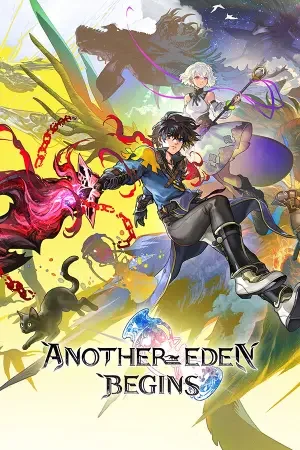
Another Eden Begins

Another Eden Begins
Platform
PC (Windows)
Release Date
File Size
10.02 GB
Views
32
Patch Notes
1
Comments
0
Languages
English, Simplified Chinese, Traditional Chinese, Japanese, Korean
Added by

Play modes & compatibility

Play modes

  • Single-player

Compatibility

  • Controller support
Download Game Build 25296903

Version Status

Current Version
Build 25296903
Current Build
25296903
Latest Build
25296903
Last Steam Update
Rate & review
No ratings yet.
Mostly Positive
76%
44

Screenshots

Another Eden Begins — Screenshots 1
Another Eden Begins — Screenshots 2
Another Eden Begins — Screenshots 3
Another Eden Begins — Screenshots 4
Another Eden Begins — Screenshots 5
Another Eden Begins — Screenshots 6
Another Eden Begins — Screenshots 7
Another Eden Begins — Screenshots 8

Description

Another Eden Begins is a classic Japanese role-playing game centered entirely around the concept of time travel across antiquity, the present, and the distant future. The story follows a young swordsman named Aldo who embarks on an epic quest through different eras and space-time rifts to rescue his kidnapped sister and save the world from destruction. The core gameplay focuses on exploring diverse environments, recruiting a large cast of unique companions, completing personal character quests, and engaging in tactical turn-based battles where players must strategically combine party skills. Originally born as a mobile live-service game, this reworked premium console and PC release removes all mobile restrictions, offering a fully voiced main campaign, deep narrative choices leading to over ten different endings, and a nostalgic single-player adventure.

System Requirements

Minimum

OS:
Windows® 11
Processor:
AMD Ryzen™ 3 2300X / Intel® Core™ i3-8100
RAM:
8 GB RAM
Graphics:
AMD Radeon™ RX 460 / Intel® Arc™ A380 / NVIDIA® GeForce® GTX 750
Storage:
10 GB available space
DirectX:
Version 11

Recommended

OS:
Windows® 11
Processor:
AMD Ryzen™ 5 2600 / Intel® Core™ i5-8400
RAM:
8 GB RAM
Graphics:
AMD Radeon™ RX 470 / Intel® Arc™ A580 / NVIDIA® GeForce® GTX 1060
Storage:
10 GB available space
DirectX:
Version 11

Installation Guide

Step-by-step setup process for Pre-installed (Portable)

  1. No installation is needed — the game comes fully pre-installed and ready to play.

  2. Extract the RAR / ZIP archive with WinRAR or 7-Zip into any folder, for example C:\Games\GameName.

  3. Launch the game via Run Me!.bat (or the main .exe file) inside the game folder.

Game Info

Platform
PC (Windows)
Release Date
File Size
10.02 GB
Status
Pre-installed (Portable)

Download Game

Full game 5

GOFILE
Another.Eden.Begins-RUNE.iso
MEDIAFIRE
Another.Eden.Begins-RUNE.iso
1FICHIER
Another.Eden.Begins-RUNE.iso
DATANODES
Another.Eden.Begins-RUNE.iso
BOWFILE
Another.Eden.Begins-RUNE.iso

Patch Notes

Official changelists for the builds of this game

Another Eden Begins launches simultaneously worldwide!

Build 25296903

Another Eden Begins launches simultaneously worldwide!

Another Eden Begins, is a New Time-Travel RPG Released Today for Nintendo Switch 2, Nintendo Switch, and Steam

About Another Eden Begins:

Another Eden Begins is the brain child of Masato Kato, the creator of numerous classic RPGs such as Chrono Trigger, Xenogears, and Final Fantasy XI and invites players to discover this time-travel RPG that spans the ancient past, the present, and the future.
The epic main story is fully voiced, and the adventure is brought to life by the main theme composed by Yasunori Mitsuda, as well as music produced by Procyon Studio that incorporates orchestral and traditional instruments.

Serial Code Bonuses

Only players who purchase the Steam version of the game early can use the following Another Eden: The Cat Beyond Time and Space serial codes. Note: Please be aware that no serial codes come with the Nintendo Switch™ 2 / Nintendo Switch™ download versions of the game. For more information about serial codes, please read the following. https://anothereden.games/en/#serialcodes

Additional Character Pack DLCs Coming One After Another!

Additionally, Character Expansion Pack Vol. 1 and 2 have been made available as DLC and as part of the game’s Season Pass. The Season Pass allows players to purchase the extra characters in the DLC at a discount. Both, DLC and Season pass are available on this release date.
Apart from two additional playable characters, the expansions each feature its own exclusive quests for players to enjoy.
Character Expansion Pack Vol. 1: Thillelille & Tiramisu
Character Expansion Pack Vol. 2: Elseal & Benedict
Content:
The DLC for Another Eden Begins allows players to recruit new playable characters as party members.
In addition to new quests, they can also enjoy storylines for each of these characters, including party quests and affinity quests.
DLC Price: 9.99 USD (per Expansion)
Note: To access DLC, players must own the main game.
Season Pass offering discounted access to Additional Character Packs Volumes 1-5 is now available!
Season Pass: Includes Character Packs Vol. 1–5 at a discount:
Character Expansion Pack Vol. 1: Thillelille & Tiramisu
Character Expansion Pack Vol. 2: Elseal & Benedict
Character Expansion Pack Vol. 3: Aoife & Wenefica
Character Expansion Pack Vol. 4: Claude & Isuka
Character Expansion Pack Vol. 5: Ashtear & Victor
Season Pass Price: 44.99 USD
Note: Volume 3 through 5 for the Character Expansion Packs are scheduled to be sold in 2026. As soon as they are released they can be downloaded.

Another Eden Begins Demo Transferring Save Data

Steam®

You will need to transfer your demo save data manually.
Please follow the steps below.

1. To prevent Steam Cloud syncing, select the game in the Steam launcher library, click on the cog in the upper right, and select Properties.

2. In the General tab, turn off "Keep game's saves in the Steam Cloud for Another Eden Begins."
If you have already launched Another Eden Begins on Steam, proceed to step 3. If not, proceed to step 4.

3. Delete "C:\\Users\\<Username>\\AppData\\LocalLow\\WRIGHT FLYER STUDIOS\\AnotherEdenBegins\\SaveData" (if it exists).

4. Copy "C:\\Users\\<Username>\\AppData\\LocalLow\\WRIGHT FLYER STUDIOS\\AnotherEdenBeginsDemo\\SaveDataDemo."

5. Paste the above folder into “C:\\Users\\<Username>\\AppData\\LocalLow\\WRIGHT FLYER STUDIOS\\AnotherEdenBegins\\"

6. Rename "SaveDataDemo" to "SaveData."

7. Launch the full game.
Once save data has been successfully transferred, enable Steam Cloud as needed.

Steam® Deck

You will need to transfer your demo save data manually.
Please follow the steps below.

1. Press the STEAM button, select Settings, and scroll down to the Cloud tab. Turn off "Enable Steam Cloud."

2. Return to the home screen, press the STEAM button, and go to Power. Select "Switch to Desktop."

3. Select the file manager (default: Dolphin) to go directly to the compatdata folder.
If you are not directed to the compatdata folder, click the ≡ icon and select "Show Hidden Files."

4. Go to Home > .local > share > Steam > steamapps > compatdata.
If you have already launched Another Eden Begins on the Steam Deck, proceed to step 5. If not, proceed to step 7.

5. Go to 4163960 > pfx > drive_c > users > steamuser > AppData > LocalLow > WRIGHT FLYER STUDIOS > AnotherEdenBegins.

6. Select "SaveData," press L2 or right click, and select "Move to Trash" to delete the folder.

7. Click the ≡ icon on the upper right of the file manager, and select "New Tab."

8. Go to 4391790 > pfx > drive_c > users > steamuser > AppData > LocalLow > WRIGHT FLYER STUDIOS > AnotherEdenBeginsDemo.

9. Select "SaveDataDemo," press L2 or right click, and select "Copy."

10. Return to the AnotherEdenBegins folder in the file manager window.

11. In an empty space, press L2 or right click to paste the folder, check "Apply to All," and select "Write Into" or "Overwrite."

12. Press L2 or right click on "SaveDataDemo," and select "Rename."

13. Press the STEAM button and the X button to open the on-screen keyboard, and rename the folder "SaveData."

14. Press the B button to close the keyboard.

15. Close the file manager window, and select "Return to Gaming Mode."

16. Launch the full game.
Once save data has been successfully transferred, enable Steam Cloud as needed.

Source: Steam announcement SteamDB

Reviews

0.0
out of 5
0 ratings

No ratings yet.

No written reviews for this game yet.

Rate this repack in the form below and your comment becomes the first review here.

Comments (0)

No comments yet. Be the first to leave one!

Leave a Comment

Rate this game
0 / 1000

Add a rating and your comment is published as a review too.

Please follow our community standards. Read the community rules

Similar Games