Перейти к содержимому

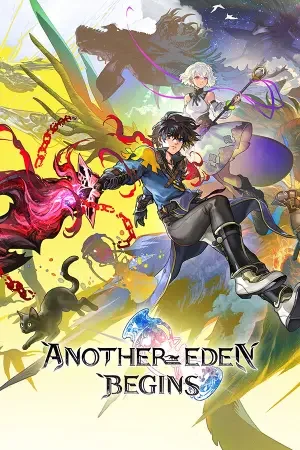
Another Eden Begins

Another Eden Begins
Платформа
PC (Windows)
Дата выхода
Размер файла
10.02 GB
Просмотры
38
Списки изменений
1
Комментарии
0
Языки
English, Simplified Chinese, Traditional Chinese, Japanese, Korean
Добавил

Режимы игры и совместимость

Режимы игры

  • Одиночная игра

Совместимость

  • Поддержка контроллера
Скачать игру Сборка 25296903

Статус версии

Текущая версия
Сборка 25296903
Текущая сборка
25296903
Последняя сборка
25296903
Последнее обновление Steam

Скриншоты

Another Eden Begins — Скриншоты 1
Another Eden Begins — Скриншоты 2
Another Eden Begins — Скриншоты 3
Another Eden Begins — Скриншоты 4
Another Eden Begins — Скриншоты 5
Another Eden Begins — Скриншоты 6
Another Eden Begins — Скриншоты 7
Another Eden Begins — Скриншоты 8

Описание

Another Eden Begins — это классическая японская ролевая игра, сюжет которой полностью построен на концепции путешествий во времени через древность, настоящее и далекое будущее. Главный герой по имени Альдо отправляется в опасное приключение сквозь эпохи и измерения, чтобы спасти свою похищенную сестру и предотвратить уничтожение мира. Полноценный игровой процесс предлагает исследовать разнообразные локации, собирать команду из многочисленных колоритных спутников, выполнять их личные задания и участвовать в пошаговых стратегических битвах, где нужно грамотно комбинировать умения бойцов. Проект является переработанным одиночным консольным изданием известной мобильной игры, поэтому здесь нет привычных бесплатных ограничений, а сюжетная линия имеет полностью озвученные диалоги, текстовую нелинейность с более чем десятью различными финалами и классическую атмосферу приключений золотой эпохи жанра.

Системные требования

Минимальные

ОС:
Windows® 11
Процессор:
AMD Ryzen™ 3 2300X / Intel® Core™ i3-8100
ОЗУ:
8 GB RAM
Видеокарта:
AMD Radeon™ RX 460 / Intel® Arc™ A380 / NVIDIA® GeForce® GTX 750
Диск:
10 GB available space
DirectX:
Version 11

Рекомендуемые

ОС:
Windows® 11
Процессор:
AMD Ryzen™ 5 2600 / Intel® Core™ i5-8400
ОЗУ:
8 GB RAM
Видеокарта:
AMD Radeon™ RX 470 / Intel® Arc™ A580 / NVIDIA® GeForce® GTX 1060
Диск:
10 GB available space
DirectX:
Version 11

Инструкция по установке

Пошаговый процесс установки для Pre-installed (Portable)

  1. Установка не требуется — игра полностью предустановлена и готова к запуску.

  2. Распакуйте архив RAR / ZIP через WinRAR или 7-Zip в любую папку, например C:\Games\GameName.

  3. Запустите игру через Run Me!.bat (или основной .exe-файл) в папке с игрой.

Информация

Разработчик
WRIGHT FLYER STUDIOS
Издатель
WRIGHT FLYER STUDIOS
Платформа
PC (Windows)
Дата выхода
Размер файла
10.02 GB
Статус
Уже установлено (Portable)

Скачать игру

Полная игра 5

GOFILE
Another.Eden.Begins-RUNE.iso
MEDIAFIRE
Another.Eden.Begins-RUNE.iso
1FICHIER
Another.Eden.Begins-RUNE.iso
DATANODES
Another.Eden.Begins-RUNE.iso
BOWFILE
Another.Eden.Begins-RUNE.iso

Списки изменений

Официальные списки изменений для сборок игры

Another Eden Begins launches simultaneously worldwide!

Сборка 25296903

Another Eden Begins launches simultaneously worldwide!

Another Eden Begins, is a New Time-Travel RPG Released Today for Nintendo Switch 2, Nintendo Switch, and Steam

About Another Eden Begins:

Another Eden Begins is the brain child of Masato Kato, the creator of numerous classic RPGs such as Chrono Trigger, Xenogears, and Final Fantasy XI and invites players to discover this time-travel RPG that spans the ancient past, the present, and the future.
The epic main story is fully voiced, and the adventure is brought to life by the main theme composed by Yasunori Mitsuda, as well as music produced by Procyon Studio that incorporates orchestral and traditional instruments.

Serial Code Bonuses

Only players who purchase the Steam version of the game early can use the following Another Eden: The Cat Beyond Time and Space serial codes. Note: Please be aware that no serial codes come with the Nintendo Switch™ 2 / Nintendo Switch™ download versions of the game. For more information about serial codes, please read the following. https://anothereden.games/en/#serialcodes

Additional Character Pack DLCs Coming One After Another!

Additionally, Character Expansion Pack Vol. 1 and 2 have been made available as DLC and as part of the game’s Season Pass. The Season Pass allows players to purchase the extra characters in the DLC at a discount. Both, DLC and Season pass are available on this release date.
Apart from two additional playable characters, the expansions each feature its own exclusive quests for players to enjoy.
Character Expansion Pack Vol. 1: Thillelille & Tiramisu
Character Expansion Pack Vol. 2: Elseal & Benedict
Content:
The DLC for Another Eden Begins allows players to recruit new playable characters as party members.
In addition to new quests, they can also enjoy storylines for each of these characters, including party quests and affinity quests.
DLC Price: 9.99 USD (per Expansion)
Note: To access DLC, players must own the main game.
Season Pass offering discounted access to Additional Character Packs Volumes 1-5 is now available!
Season Pass: Includes Character Packs Vol. 1–5 at a discount:
Character Expansion Pack Vol. 1: Thillelille & Tiramisu
Character Expansion Pack Vol. 2: Elseal & Benedict
Character Expansion Pack Vol. 3: Aoife & Wenefica
Character Expansion Pack Vol. 4: Claude & Isuka
Character Expansion Pack Vol. 5: Ashtear & Victor
Season Pass Price: 44.99 USD
Note: Volume 3 through 5 for the Character Expansion Packs are scheduled to be sold in 2026. As soon as they are released they can be downloaded.

Another Eden Begins Demo Transferring Save Data

Steam®

You will need to transfer your demo save data manually.
Please follow the steps below.

1. To prevent Steam Cloud syncing, select the game in the Steam launcher library, click on the cog in the upper right, and select Properties.

2. In the General tab, turn off "Keep game's saves in the Steam Cloud for Another Eden Begins."
If you have already launched Another Eden Begins on Steam, proceed to step 3. If not, proceed to step 4.

3. Delete "C:\\Users\\<Username>\\AppData\\LocalLow\\WRIGHT FLYER STUDIOS\\AnotherEdenBegins\\SaveData" (if it exists).

4. Copy "C:\\Users\\<Username>\\AppData\\LocalLow\\WRIGHT FLYER STUDIOS\\AnotherEdenBeginsDemo\\SaveDataDemo."

5. Paste the above folder into “C:\\Users\\<Username>\\AppData\\LocalLow\\WRIGHT FLYER STUDIOS\\AnotherEdenBegins\\"

6. Rename "SaveDataDemo" to "SaveData."

7. Launch the full game.
Once save data has been successfully transferred, enable Steam Cloud as needed.

Steam® Deck

You will need to transfer your demo save data manually.
Please follow the steps below.

1. Press the STEAM button, select Settings, and scroll down to the Cloud tab. Turn off "Enable Steam Cloud."

2. Return to the home screen, press the STEAM button, and go to Power. Select "Switch to Desktop."

3. Select the file manager (default: Dolphin) to go directly to the compatdata folder.
If you are not directed to the compatdata folder, click the ≡ icon and select "Show Hidden Files."

4. Go to Home > .local > share > Steam > steamapps > compatdata.
If you have already launched Another Eden Begins on the Steam Deck, proceed to step 5. If not, proceed to step 7.

5. Go to 4163960 > pfx > drive_c > users > steamuser > AppData > LocalLow > WRIGHT FLYER STUDIOS > AnotherEdenBegins.

6. Select "SaveData," press L2 or right click, and select "Move to Trash" to delete the folder.

7. Click the ≡ icon on the upper right of the file manager, and select "New Tab."

8. Go to 4391790 > pfx > drive_c > users > steamuser > AppData > LocalLow > WRIGHT FLYER STUDIOS > AnotherEdenBeginsDemo.

9. Select "SaveDataDemo," press L2 or right click, and select "Copy."

10. Return to the AnotherEdenBegins folder in the file manager window.

11. In an empty space, press L2 or right click to paste the folder, check "Apply to All," and select "Write Into" or "Overwrite."

12. Press L2 or right click on "SaveDataDemo," and select "Rename."

13. Press the STEAM button and the X button to open the on-screen keyboard, and rename the folder "SaveData."

14. Press the B button to close the keyboard.

15. Close the file manager window, and select "Return to Gaming Mode."

16. Launch the full game.
Once save data has been successfully transferred, enable Steam Cloud as needed.

Источник: Анонс Steam SteamDB

Обзоры

0,0
из 5
0 оценок

Оценок пока нет.

Письменных отзывов об этой игре пока нет.

Оцените этот репак в форме ниже — и ваш комментарий станет первым отзывом здесь.

Комментарии (0)

Комментариев еще нет. Будьте первым, кто оставит комментарий!

Оставить комментарий

0 / 1000

Поставьте оценку — и ваш комментарий будет опубликован ещё и как отзыв.

Соблюдайте правила нашего сообщества. Открыть правила сообщества

Похожие игры